
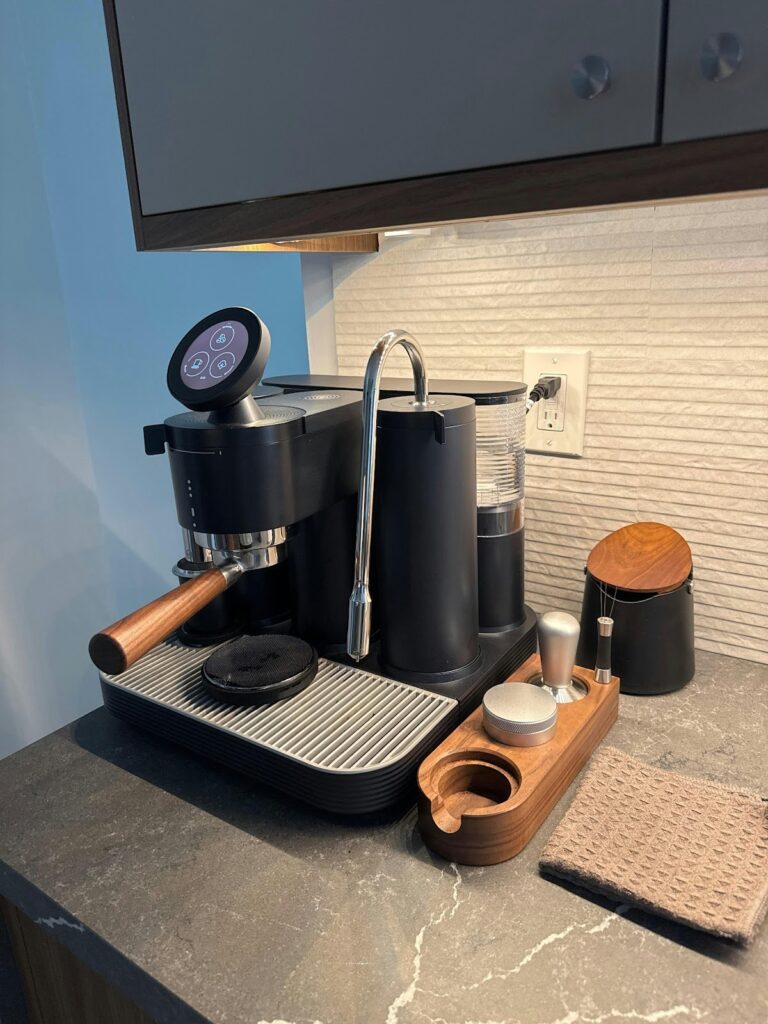
There’s something genuinely thrilling about unboxing a new smart coffee machine—the promise of barista-quality coffee at your fingertips, controlled from your smartphone, ready to transform your morning routine. The Meraki Smart Coffee Machine delivers on this promise with its automatic dosing system, precision extraction technology, and seamless app integration that puts complete control in your hands. However, many new owners find themselves overwhelmed when faced with multiple components, connectivity requirements, and unfamiliar settings that stand between them and their first perfect cup. The initial setup process can feel daunting, especially when you’re eager to start brewing but unsure where to begin. This guide walks you through every step of unboxing, installing, and configuring your Meraki Smart Coffee Machine, from safely removing it from the package to mastering advanced features that will elevate your coffee experience. Whether you’re a tech enthusiast or simply someone who appreciates great coffee, you’ll find clear, actionable instructions that make setup straightforward and stress-free.
Unboxing Your Meraki Smart Coffee Machine
Carefully remove the outer packaging and you’ll find your Meraki Smart Coffee Machine securely nestled in protective foam. Inside the box, you should locate the main machine unit, a removable water tank, drip tray with waste container, power cable, cleaning brush, water hardness test strip, descaling solution sample, and a quick-start guide. Take a moment to verify all components against the included checklist before discarding any packaging materials.
When lifting the machine from its box, support it from the bottom with both hands rather than pulling from the top or sides. Examine the exterior for any shipping damage, paying special attention to the display screen and water tank compartment. Remove all protective tape and foam inserts from the machine’s exterior and interior compartments, including any pieces securing the brewing unit during transit.
Before brewing your first cup, run a cleaning cycle to remove manufacturing residues. Fill the water tank with fresh water to the maximum line, ensuring it clicks securely into place. Insert the drip tray and waste container until you hear them lock. Wipe down all external surfaces with a damp cloth, then run two full water-only brewing cycles without coffee grounds. This flushes the internal system and prepares the machine for optimal performance. Allow the discarded water to cool before disposal, and your machine is now ready for the initial setup process.
Initial Setup and Installation
Position your Meraki Smart Coffee Machine on a stable, level surface near a grounded electrical outlet, ensuring at least four inches of clearance on all sides for ventilation and easy access to the water tank. Avoid placing it under cabinets or near heat sources, as steam vents from the top during brewing. The location should also have reliable Wi-Fi coverage for seamless app connectivity.
Remove the water tank by lifting it straight up from the rear compartment, rinse it thoroughly with fresh water, then fill it to your desired level between the minimum and maximum indicators. Slide the tank back into position until it seats firmly—you’ll feel a slight resistance followed by a secure click. Plug the power cable into the machine first, then into your wall outlet. Press the power button and wait approximately thirty seconds while the machine performs its initial startup sequence, indicated by a series of lights and a brief pump sound as it primes the internal water lines.
The display will prompt you to select your language and confirm your time zone. Use the touchscreen or dial control to navigate these initial settings, which ensure accurate scheduling features later. The machine will then run an automatic calibration cycle, adjusting pressure sensors and temperature controls for optimal performance.
Connecting to the Meraki App
Download the Meraki Coffee app from the App Store or Google Play Store and create your account using an email address. Open the app and tap “Add New Machine,” which activates pairing mode. On your coffee machine, navigate to Settings and select “Connect to App”—the display will show a flashing Wi-Fi icon. Your phone will detect the machine via Bluetooth within fifteen seconds, displaying it as “Meraki-” followed by a serial number. Tap to select it, then enter your home Wi-Fi network credentials when prompted. The machine will connect to your network, confirmed by a solid Wi-Fi icon and a notification in the app.
If the connection fails, verify your Wi-Fi password is correct and that your router broadcasts a 2.4GHz network, as the machine doesn’t support 5GHz-only networks. Move your router closer temporarily if signal strength is weak, or restart both your machine and phone before attempting pairing again. Once connected successfully, the app will download your machine’s firmware version and may prompt you to install updates immediately for the best experience.
Mastering Automatic Dosing and Precision Extraction
The automatic dosing system in your Meraki Smart Coffee Machine eliminates guesswork by measuring the exact amount of coffee grounds needed for each brew. This system uses built-in sensors to detect the selected cup size and adjusts the grind amount accordingly, ensuring consistency every time. When you select a drink type through the touchscreen or app, the machine automatically grinds and doses the precise quantity—typically ranging from seven grams for a single espresso to eighteen grams for a large cup. This automation means you’ll never waste coffee or end up with weak, under-extracted brews caused by insufficient grounds.
Adjusting coffee strength involves modifying the grind size and extraction time rather than simply adding more coffee. Access the strength settings through the machine’s menu or app, where you’ll find options labeled as mild, medium, strong, and extra strong. Each level adjusts the grinder’s burr spacing—finer grinds create stronger, more intense flavors while coarser grinds produce lighter, more delicate profiles. Volume control works independently, allowing you to brew a strong espresso shot or a large but mild cup. Experiment by starting at medium strength and adjusting incrementally until you find your preference.
Precision extraction depends on maintaining optimal water temperature and pressure throughout the brewing cycle. The Meraki machine extracts at precisely ninety-three degrees Celsius with nine bars of pressure, the professional standard for espresso. To maximize extraction quality, always use freshly roasted beans and ensure your water tank contains filtered water, as minerals affect both flavor and machine longevity. Pay attention to the extraction time displayed during brewing—a properly dialed-in shot takes twenty-five to thirty seconds. If extraction runs too quickly, increase your strength setting; if it drips slowly, decrease it slightly.
Programming custom profiles lets you save specific combinations of strength, volume, temperature, and milk settings under personalized names. Navigate to “My Drinks” in the app, select “Create New,” then brew a test cup while adjusting parameters in real-time. Once satisfied, tap “Save Profile” and assign it a name like “Morning Cappuccino” or “Afternoon Americano.” These profiles sync across the app and machine display, accessible with a single tap whenever you want that exact drink replicated perfectly.
Exploring Advanced Coffee Machine Features
Temperature customization allows you to fine-tune your brewing experience based on bean origin and roast level. Access temperature settings through the app’s advanced menu, where you can adjust brewing temperature between eighty-eight and ninety-six degrees Celsius. Lighter roasts benefit from higher temperatures that extract their delicate flavors more completely, while darker roasts shine at lower temperatures that prevent bitter notes from dominating. Brew time adjustments work in tandem with temperature—extend extraction by three to five seconds for bolder flavor profiles, or shorten it for brighter, more acidic characteristics. These changes save automatically to your custom profiles, ensuring repeatability.
The integrated milk frother transforms your machine into a complete café system capable of producing silky microfoam for cappuccinos, lattes, and flat whites. Fill the milk container to the desired level indicator, attach it to the front port until it clicks, then select your drink with milk from the menu. The machine automatically froths and dispenses milk at the optimal temperature of sixty-five degrees Celsius. For thicker foam suitable for cappuccinos, use whole milk; for lighter texture, opt for two-percent or plant-based alternatives like oat milk. Clean the milk system immediately after each use by running the automatic rinse cycle to prevent residue buildup.
Scheduled brewing lets you wake up to freshly brewed coffee without lifting a finger. Open the app, navigate to “Schedule,” and set your desired brew time along with your preferred drink profile. The machine enters standby mode and activates automatically at the scheduled time, grinding beans and brewing precisely when you want it. Smart home integration extends functionality further—connect your Meraki machine to Amazon Alexa or Google Home through the app’s integrations menu. Voice commands like “brew my morning espresso” trigger your saved profiles instantly. Maintenance reminders appear automatically in the app when descaling or cleaning cycles are due, with step-by-step guided instructions that walk you through each process. For technical support or troubleshooting beyond the app’s resources, Meraki Tech Global provides comprehensive online documentation and customer service through their support portal. The self-cleaning function runs at your command, flushing internal components with hot water to maintain peak performance between deep cleaning sessions.
Your Path to Perfect Coffee Every Morning
Setting up your Meraki Smart Coffee Machine transforms from an intimidating task into a straightforward process when you follow these systematic steps—unbox carefully while verifying all components, position the machine in an optimal location with proper ventilation, connect it to your home network through the intuitive app, and explore the automatic dosing and precision extraction features that deliver consistent results. Now that your machine is fully configured, take time to experiment with different strength levels, temperatures, and brew times to discover flavor profiles that match your preferences perfectly. The smart capabilities you’ve activated—from voice commands to scheduled brewing—mean your coffee routine adapts to your lifestyle rather than the other way around. Remember to respond promptly to maintenance reminders in the app, run regular cleaning cycles after milk-based drinks, and descale according to your water hardness level to keep your machine performing at its best. With proper care and a willingness to explore the customization options available, your Meraki Smart Coffee Machine will deliver café-quality beverages for years to come, making every morning feel like a visit to your favorite coffee shop without ever leaving home.